ProGesFinPro Gestion Financière

ProGesFin · Pro Gestion Financière

Keep the finances of your properties with the rigour of a firm — without ever depending on a connection.

ProGesFin issues your rents, records your payments and expenses, keeps your double-entry ledger and produces your reports. Everything happens on your computer; nothing leaves it.

macOS 11 and later · Apple Silicon and Intel · No account · Version 2.1.0
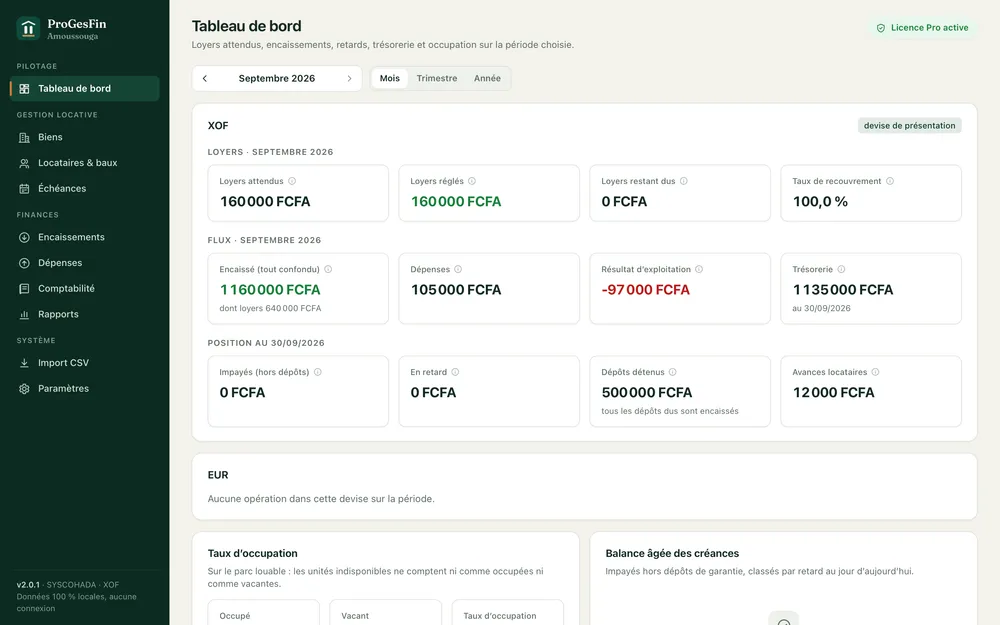
Rents, collections, arrears and occupancy, recomputed from the ledger.

What makes the difference

Tamper-proof ledgerDouble entry: an entry is reversed, never edited.
At its date, in its currencyEvery operation is recorded at its date, in its currency, with no implicit conversion.
Regenerated identicallyEvery receipt and rent receipt is stored with its SHA-256 fingerprint and reprints identically.
Nothing leaves your computerNo connection, no account, no telemetry.

Who it is for

Owners

You rent one or more properties and want to know, without a makeshift spreadsheet, who has paid, who is late, what you hold in security deposits and what your properties really yield. ProGesFin gives you an accurate dashboard, receipts ready to hand over, and annual statements to pass to your accountant.

Managers, SCIs and accountants

You keep the books of several owners or of a whole portfolio. You need double-entry accounting that follows your country’s chart of accounts, a history nobody can retouch, exports for the chartered accountant and per-property indicators — without a cloud subscription and without routing your clients' data through a server.

Launch market: property owners in Benin, on site or in the diaspora.

What it changes

You know where you stand.Rents expected, collected, outstanding, overdue; ageing balance; occupancy; cash: the dashboard recomputes everything from the ledger, not from a spreadsheet.
You hand over clean documents.Gap-free numbered receipts (REC-2026-000001) and rent receipts (QUI-2026-000001), as PDF, with the amount in words, your logo and details, in French or English, A4 or Letter.
You never lose a deposit or an advance again.Security deposits are tracked from invoicing to refund or retention; an overpayment becomes a tenant advance, never a forgotten amount.
Your accountant thanks you.Journal, trial balance and chart of accounts in revised SYSCOHADA, IFRS or PCG, exportable as CSV readable by Excel; every entry keeps the account code of the moment it was posted.
You start with your history.The import wizard brings in your properties, tenants, leases, charges, payments and opening balances from a CSV file, checking every line before writing anything.
Your data is yours.A file on your computer, backups verified by SHA-256 fingerprint, optional encryption with a printable recovery key, and no connection required — ever.

Features

What ProGesFin does for you.

Automatic rentsOne rent per lease and per month, due on the contractual day, generated automatically when the software opens and when a lease is created, with no possible duplicate; day-precise proration, contractual penalties, manual charges, justified cancellation with a reversing entry.
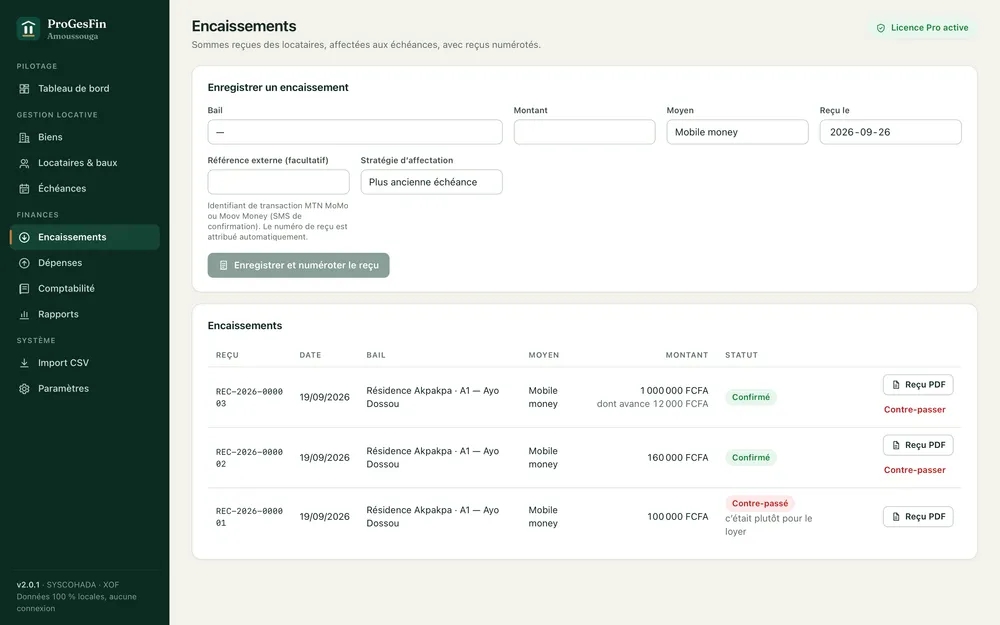
Payments and receiptsDeclarative entry of payments (cash, mobile money, transfer, cheque…), allocation proposed to the oldest charges, surplus as tenant advance, duplicate protection, numbered receipt, full justified reversal. PDF receipt and PDF rent receipt, reprintable.
Security depositsInvoicing, collection, refund with deductions; the deposit is a liability towards the tenant, never income; the deduction becomes income on refund.
ExpensesBy category (maintenance, water and energy, insurance, property tax, fees, bank charges, interest, other), paid or payable.
Double-entry accountingLedger by account roles, revised SYSCOHADA (17 OHADA states), IFRS (IAS 1, IAS 7, IAS 40, IFRS 16 lessor) and PCG (France); journal, trial balance, chart of accounts; immutable history: an entry is reversed, never edited.
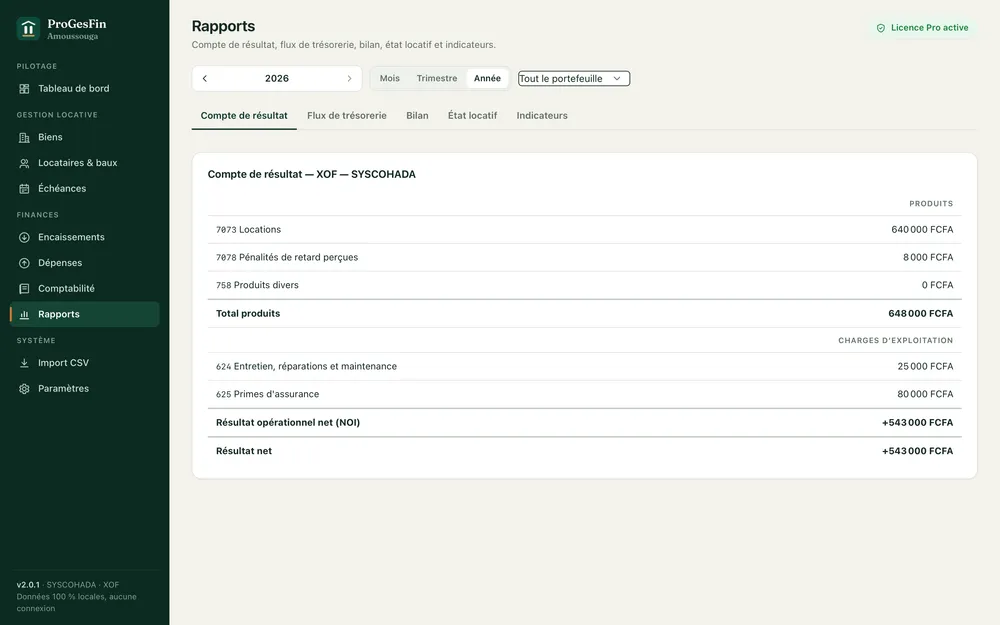
ReportsIncome statement with net operating income (NOI), cash-flow statement (direct method), balanced balance sheet, rent roll, per-property indicators (potential rent, annualised NOI, gross yield, cap rate). CSV export with “;” separator and UTF-8 BOM, readable by Excel.
DashboardRents expected, paid, outstanding, collection rate, collected and expenses for the period, cash, deposits held, advances, unpaid and overdue, ageing balance (not due, 1-30, 31-60, 61-90, 90+ days), occupancy; definitions shown as tooltips.
CSV importProperties and units, tenants, leases, history and opening balances; downloadable templates; automatic, editable column matching; line-by-line verification; all-or-nothing import. UTF-8, UTF-16 and Windows-1252; “;”, “,” and tab separators; French and English amount and date formats.
100% offlineNo connection required, no account, no telemetry. The only network function — checking for updates — runs only on your request and sends no version, identifier or data.
Verified backupsConsistent database backup with SHA-256 fingerprint; restore by simply replacing the file.
Optional encryptionDatabase encrypted with SQLCipher (AES-256), password and printable recovery key, manual or idle session lock. Off by default; enabled in minutes.
Signed updatesEvery update is signature-checked before installation and installed only after your confirmation.
International by designISO 4217 currencies with their real number of decimals (CFA franc with none, euro with two), no implicit addition across currencies, dated exchange rates; built-in reference of 252 countries and 171,000 localities; interface in French and English.

Screenshots

Demonstration dataset: fictional names, properties and amounts.
Dashboard
Rents, collections, arrears and occupancy, recomputed from the ledger.
Property sheet
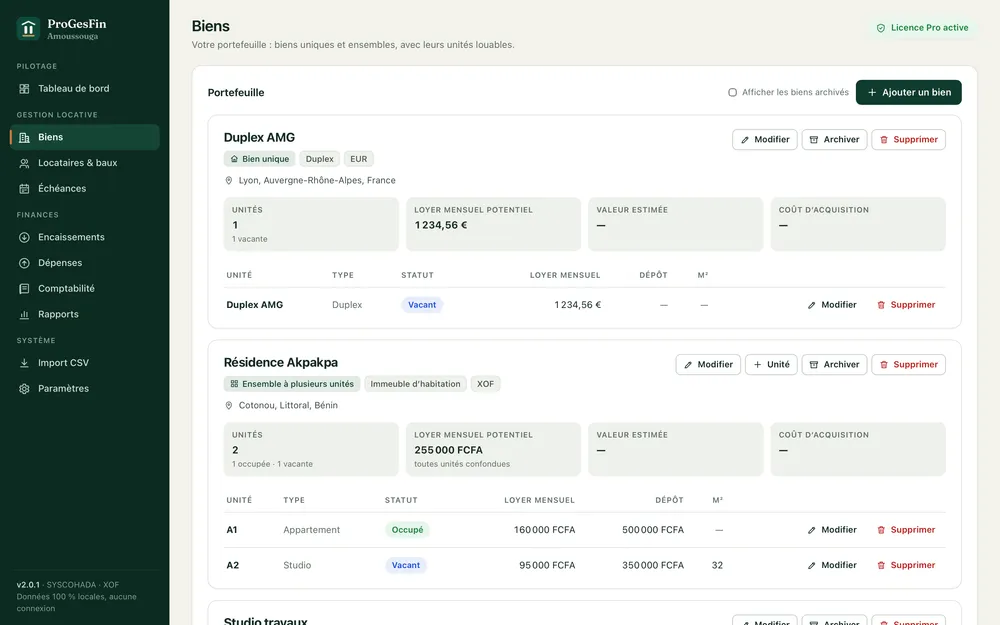
A building, its units, its leases and its indicators.
Payment and receipt
A payment allocated to charges, its numbered PDF receipt.
Report
Income statement and cash flow in SYSCOHADA format.

In one minute

See ProGesFin at work.

Presentation clip — 49 seconds: the problem, three highlights, the free trial.

Download the free trial — 30 days

Trial and licence

30-day trial, no account. Afterwards, your data stays yours.

Download, install, work: no account, no email address, no key to enter. Every feature is available during the trial. At the end, the software switches to read-only: you can still view, export and back up your data — it is never held hostage — and a licence restores writing without reinstalling anything.

Request a licence
FeatureSolo — self-servicePro — professional
For whomIndividual ownerManager, SCI, multi-owner accountant
Seats12
Rentable unitsup to 10unlimited
SYSCOHADA, IFRS, PCG · reports · dashboard · backups✓✓
PDF receipts · CSV import · encryption✓✓
Consolidated multi-currency, advanced accounting exports—✓
Supportemailpriority email
Annual subscriptionCA$ 99 per yearOn request

Firms and manager networks (5 seats and more): on quote. Prices before tax, invoiced in Canadian dollars.

Download

ProGesFin 2.1.0

October 10, 2026 · macOS 11 or later · Apple Silicon and Intel (universal binary) · 26.3 MB

SHA-256 fingerprint
SHA-256013dd2590ab478af5b30d176e174b25d2a56ea35ac3abb0b710ce6e7eed88efa

Signed with the Apple Developer ID certificate of a co-founder of Sharpe Finance Conseil Inc., and notarized by Apple. Verify the fingerprint after downloading: it must match the one shown here.

User guide

Twenty chapters, screen by screen.

Installation, organisation, properties and units, leases, rents, payments and rent receipts, accounting, reports, importing your history, backups, encryption, licensing — with a six-step monthly routine and a troubleshooting chapter.

Frequently asked questions

Does ProGesFin work without the Internet?
Yes, entirely. No function requires a connection: not the installation, the trial, the licence activation or document generation. Checking for updates is the only network function, and it runs only when you ask.
Where is my data?
In a file on your computer (progesfin.db, in the application’s data folder). Nothing is sent to the publisher, Sharpe Finance Conseil Inc., or anyone else. You can back it up, copy it and encrypt it.
Does ProGesFin collect rents on my behalf?
No. ProGesFin records the payments you receive (cash, mobile money, transfer…); it holds no funds and calls no payment provider. This is deliberate: your data, your computer, your money — we do not touch them.
Which charts of accounts are available?
Revised SYSCOHADA (default for OHADA countries), IFRS and PCG (France). The chart is chosen when the organisation is created; statements are recomputed by account role, and every entry keeps the account code of its chart.
Can I bring my data over from Excel or another tool?
Yes, through the CSV import wizard: properties and units, tenants, leases, charge and payment history, opening balances. Templates are provided; every line is checked before the import, which is all or nothing.
What happens at the end of the trial?
The software switches to read-only: viewing, exports and backups remain possible. A licence restores writing immediately, with no reinstall and no data loss.
All questions

System requirements

macOS macOS 11 Big Sur or later · Apple Silicon (M1 and later) and Intel — one universal installer · about 20 MB · no Internet connection required.

Windows 10 / 11 and Linux Windows is available as a beta: the same software, with an installer not yet signed by an Authenticode certificate — Windows shows a warning on first launch. Linux will follow.

Data A single SQLite file in the application folder (~/Library/Application Support/com.sefen.progesfin/ on macOS), easy to back up and move.

A question before you start?

Write to us: we reply in French or English within two business days.

Write to us